
Why repair-shop inventory is different
A repair shop can have several kinds of stock moving through different workflows on the same day.
A small phone repair shop may hold repair parts, consumables, accessories, retail products, and special-order parts at the same time. A screen may be received for a specific model, adhesive may be used during several jobs, and a charger may be sold directly at checkout. Those movements do not all have the same meaning.
The important question is not only ‘How many items do I have?’ It is ‘What do I have, where did it come from, what repair or sale used it, and what should be available right now?’ That answer requires a record of stock movement, not only an occasional shelf count.
If your shop is still standardizing the front-counter handoff, the repair shop intake process guide is a useful companion. Clean intake creates the repair context that parts usage can later attach to.
- Repair parts: screens, batteries, charging ports, cameras, and small components
- Consumables: adhesives, solvents, tapes, cleaning materials, and protective supplies
- Accessories: cases, cables, chargers, screen protectors, and similar products
- Retail products or devices: items sold without becoming part of a repair
- Special-order parts: items ordered for one job and not yet available for general use
Separate repair parts from retail stock
Useful categories make purchasing and stock review easier to understand.
Do not force every item into one generic ‘product’ bucket. A replacement screen, a bottle of adhesive, a phone case, and a retail device may all be physical items, but the shop handles them differently. Parts are consumed by repair work. Accessories are sold. Consumables may be used in small quantities without being billed as a distinct line item. Special-order items may already have a job waiting for them.
A practical category structure could include screens, batteries, charging ports, cameras, adhesives, small components, accessories, and retail devices. Treat that as a starting point, not a universal taxonomy. Your categories should match how staff search, receive, use, count, and order items.
Give every stocked item a consistent identity
Staff should be able to recognize the same part before it enters a purchase, repair, or count.
Inconsistent names create hidden duplicates. ‘iPhone 13 screen,’ ‘13 OLED,’ and ‘i13 display’ may describe the same item to one technician but look like three different items during purchasing. Pick a naming convention that includes the device or model detail staff actually need, then use it everywhere.
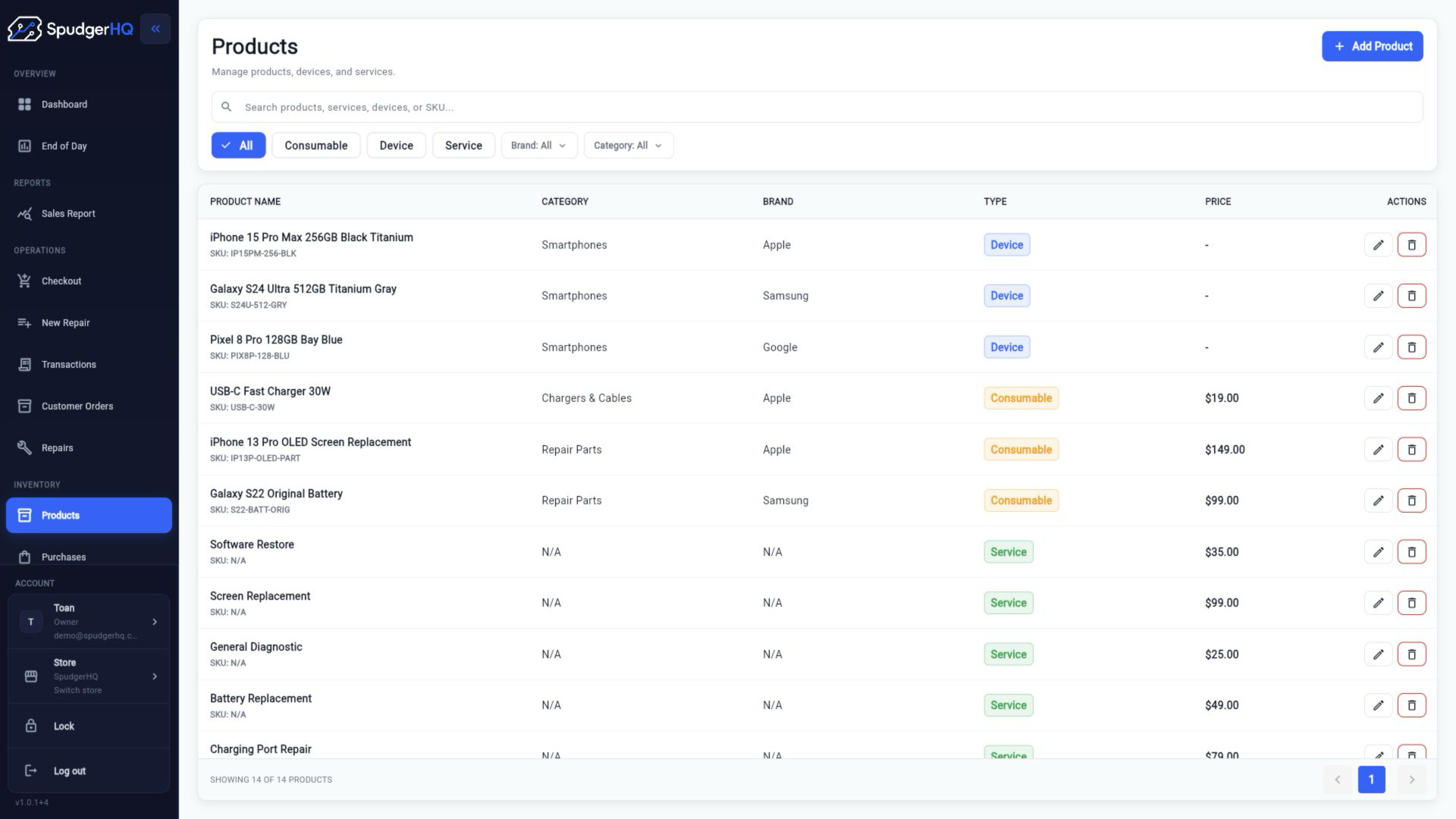
For each stocked item, capture the fields that help your shop identify, buy, price, and count it. Not every field needs to be mandatory for every category, but omissions should be deliberate rather than accidental.
- Clear product or part name
- SKU or internal identifier where your shop uses one
- Brand
- Compatible device or model
- Supplier
- Category
- Cost
- Selling or service price where relevant
- Minimum quantity where your shop uses one
Record stock when it enters the shop
Receiving is the first control point between a supplier delivery and an available part.
Putting a delivery on the shelf before updating the record creates a gap immediately. The part may be used, moved, or mixed with older stock before anyone records its quantity. Later, staff see a number that does not match the shelf and cannot tell whether the cause was a missing item, a damaged item, an unrecorded receipt, or a repair that used the part.
Use one receiving sequence for every supplier, even when the delivery is small. If a delivery is partial, record what actually arrived and leave the remainder outstanding instead of treating the order as complete.
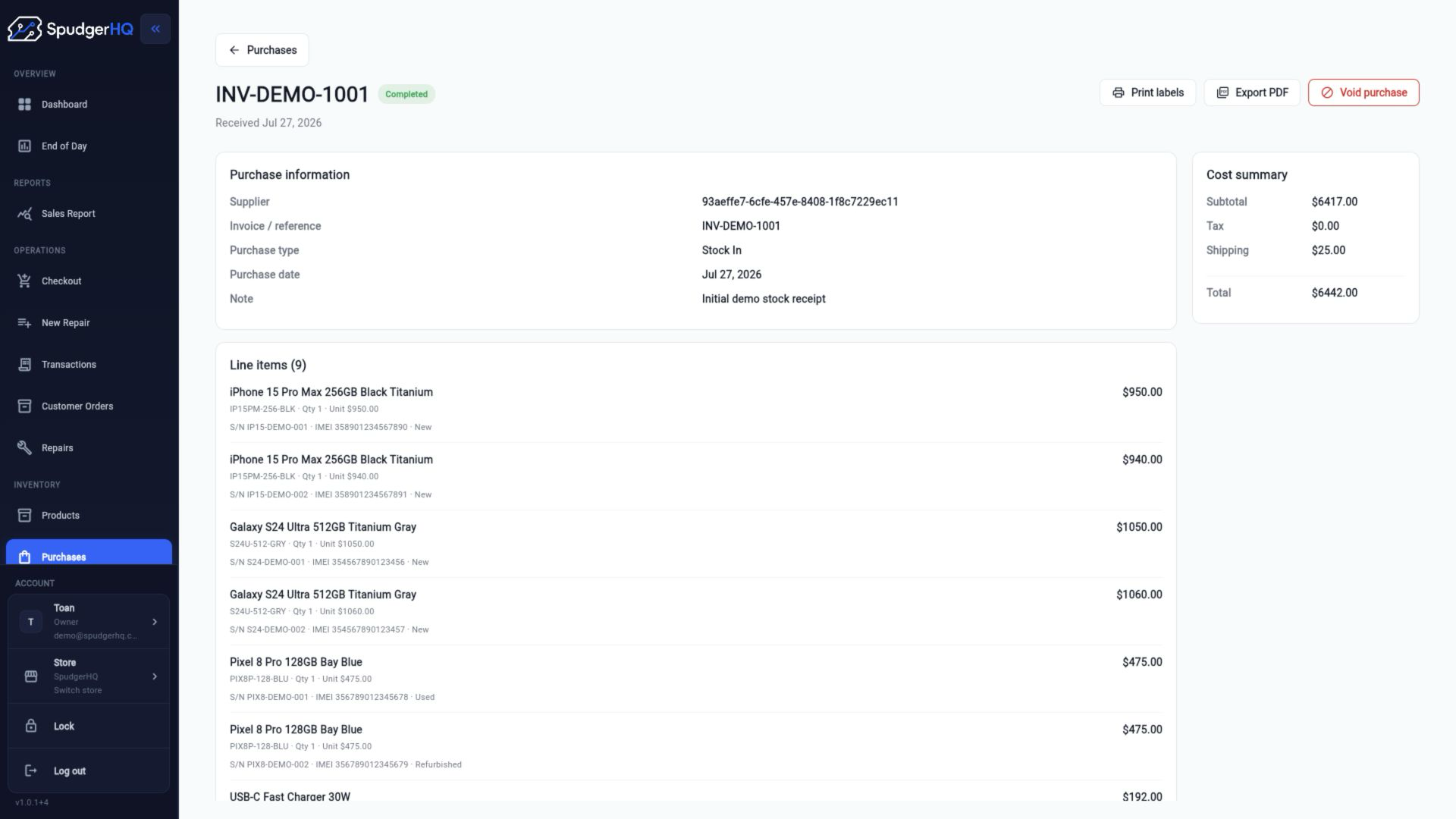
- Create or identify the purchase/order record.
- Confirm the supplier and invoice or reference.
- Open the delivery and check each part against the order.
- Separate damaged, wrong, or missing items before shelving anything.
- Record the quantity actually received and any relevant cost details.
- Put accepted parts into their normal stock location.
- Mark the purchase or receiving step complete only when the delivery is reconciled.
Connect parts usage to repair jobs
A part should not disappear from stock without a reason connected to the work that used it.
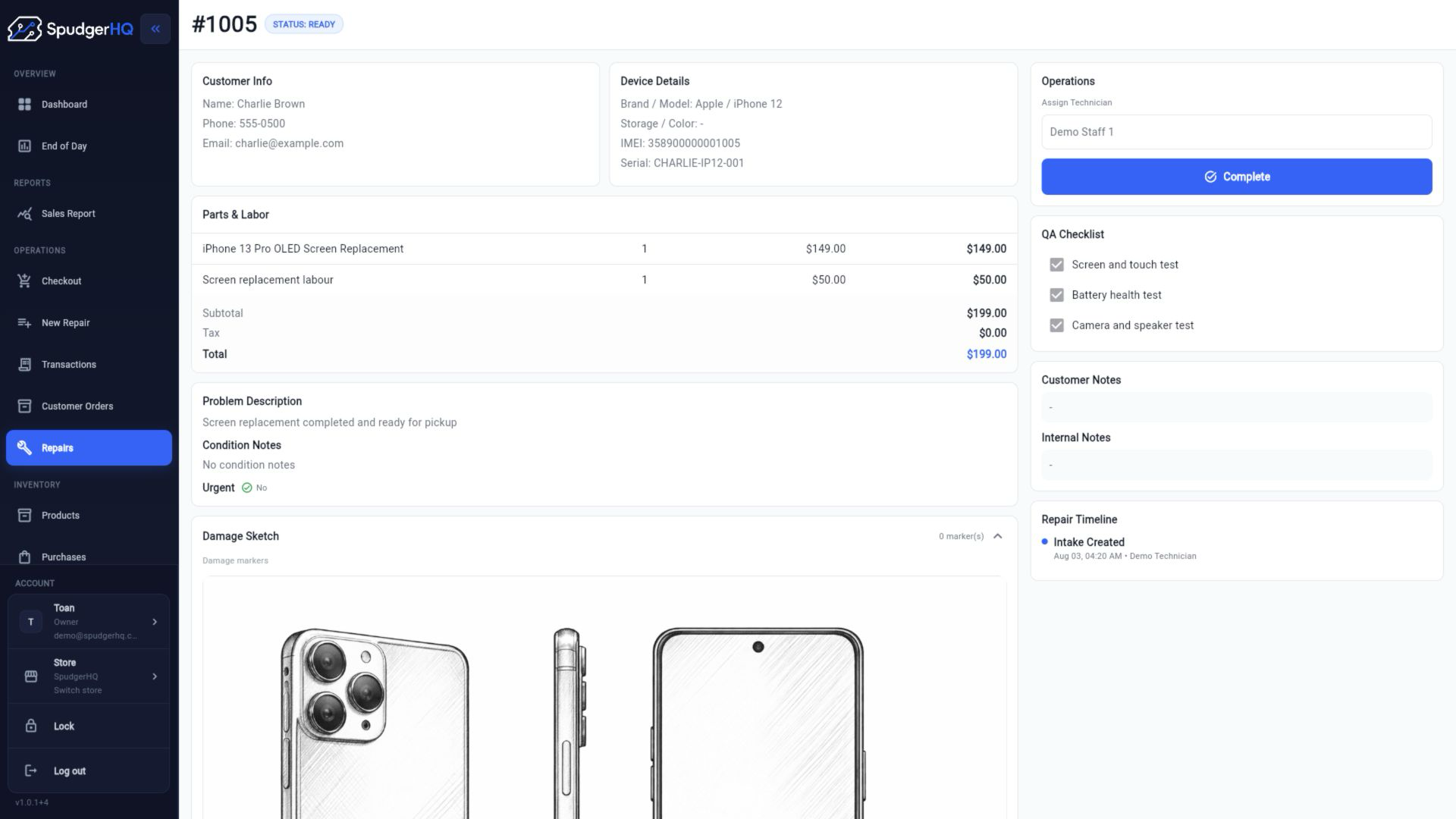
When a technician takes a screen from the shelf, the shop should be able to follow the movement from part to repair ticket to customer and device. That connection helps staff understand what was actually consumed, review part usage, and investigate a difference without relying on memory.
The record does not need to promise advanced costing. Start with the basics: identify the correct ticket, select the correct part, record the quantity used, and return unused stock when appropriate. For the wider job context, see repair ticket software for phone repair shops.
If a part is defective, replaced, or removed from the repair, do not leave the original usage record unexplained. Handle the physical item and the record using the same rule every time, then note what happened.
Handle special-order and waiting-for-parts jobs
A repair can be active even when its required part has not arrived.
A customer repair may need a part that is not currently available. If the shop records only ‘waiting’ in a message or on a paper note, staff can lose the connection between the repair, the required item, and the supplier order. The part may arrive without a clear owner, or someone may order it twice.
Use a consistent waiting-for-parts record. Keep the job status and the purchasing detail connected in whatever system your shop uses, then update the repair when the part is received and assigned.
For a focused walk-through of the blocked repair from missing-part confirmation through resumed work, read the waiting for parts workflow guide.
- Which repair needs the part
- Which part and quantity are required
- Whether the part has been ordered
- Which supplier is being used
- Expected arrival, where your shop tracks it
- Current repair status
- What staff should do when the part arrives
Define stock adjustments clearly
Not every stock change is a sale or a repair consumption.
Stock numbers change when a part is damaged, found, returned to a supplier, used internally, lost, or corrected after a count. These events are normal. The control is recording why the number changed instead of silently replacing the old number.
Use a short, consistent reason and add a note when the event needs context. A future count should be able to distinguish a real usage event from a correction made after an investigation.
- Damaged part
- Defective part
- Supplier return
- Found stock
- Counting correction
- Internal use
- Lost item
Use minimum stock levels carefully
A low-stock rule should reflect how your shop actually repairs, buys, and stores parts.
For commonly used parts, a shop may choose a minimum quantity that prompts a purchasing review. That quantity is a local operating choice, not a universal industry threshold. A popular screen with a long supplier lead time may deserve a different rule from a slow-moving part that ties up cash and shelf space.
Review minimums using repair frequency, supplier lead time, cost, shelf space, model popularity, and the amount of cash tied up in stock. Do not treat every item as something the shop should always keep on hand.
- Avoiding stockouts for frequently used parts
- Avoiding excess stock for slow-moving parts
- Leaving room for supplier delays or partial deliveries
- Keeping cash available for parts customers actually request
Build a simple purchasing process
Purchasing works best when it starts from a visible stock need and ends with a reconciled receipt.
Before placing an order, check usable stock, parts already on order, and repairs waiting for the item. This avoids duplicate orders and makes the quantity decision easier to explain. After ordering, keep the supplier and reference with the purchase record so receiving does not have to reconstruct the decision later.
A small-shop purchasing loop can stay simple while still being disciplined:
- Review the stock need and outstanding purchases.
- Choose the supplier and record the order reference.
- Record the quantity ordered and expected cost where relevant.
- Receive and check the delivery against what was ordered.
- Handle partial deliveries, substitutions, or missing items explicitly.
- Update available stock with the quantity actually received.
Count stock regularly
Recorded inventory drifts from physical inventory unless the shop checks both.
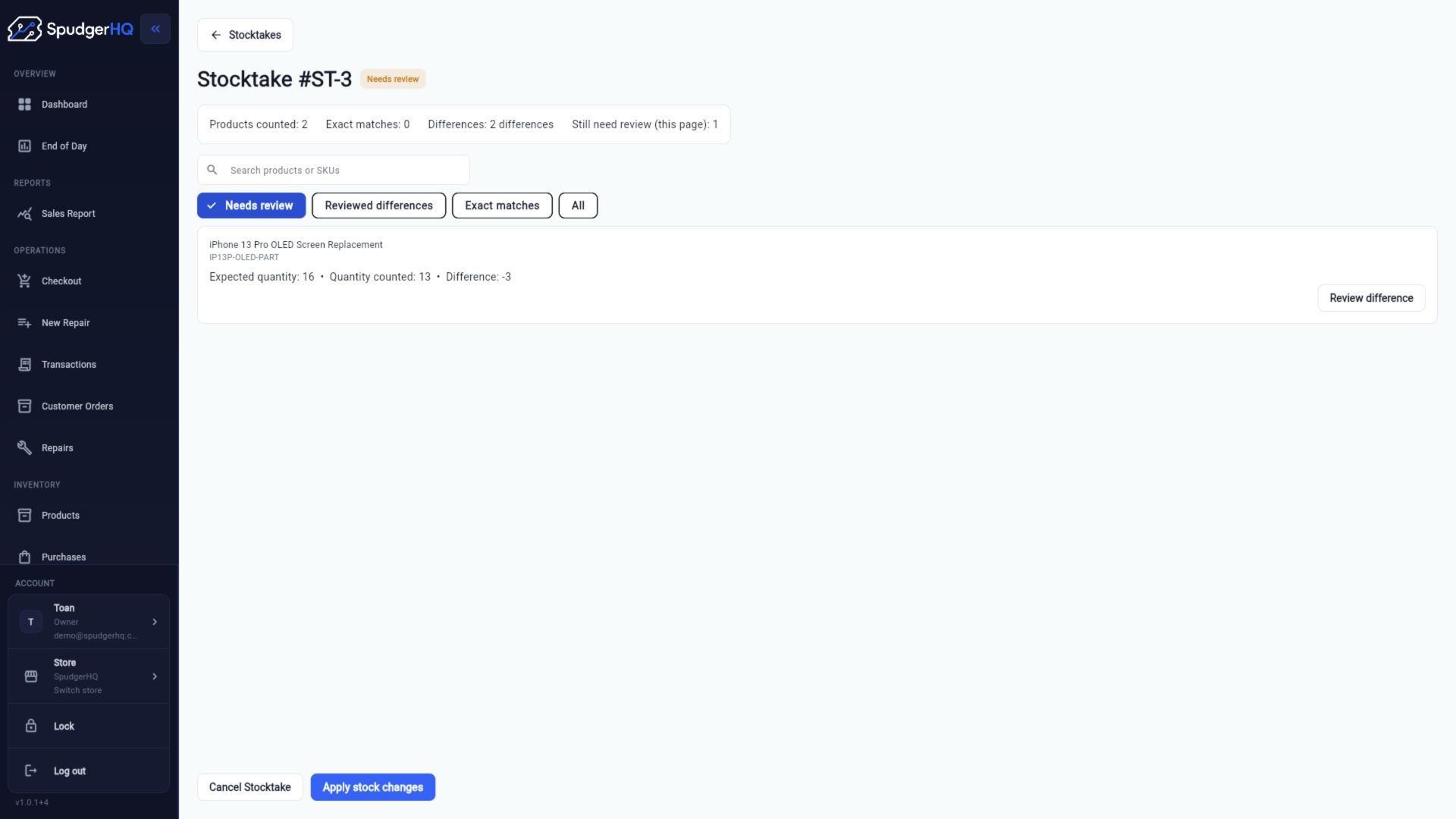
A part can be misplaced, damaged, used without being recorded, entered under the wrong item, or counted incorrectly during receiving. A periodic physical count exposes that drift. The goal is not to punish staff for every difference; it is to find where the process stopped matching reality.
Use cycle counting for high-use or high-value items when a full count is difficult. Whatever cadence you choose, make the count easy to review and require an approved reason before applying a meaningful adjustment.
- Count the physical quantity without relying on the recorded number as your answer.
- Compare the count with the recorded quantity.
- Investigate meaningful differences against purchases, repairs, sales, returns, and prior adjustments.
- Record an approved correction with a reason.
- Complete or reconcile the count so unresolved differences remain visible.
Common repair-shop inventory mistakes
Most stock problems begin at a handoff between people, records, and physical items.
Each mistake below is fixable. The useful response is to add one clear step to the normal workflow, not to create a complicated policy that staff will skip during a busy counter shift.
- Receiving parts without recording them: available stock looks higher physically than it does in the record.
- Taking a part for a repair without recording usage: the shop loses the link between consumption and the job.
- Using inconsistent part names: staff cannot tell whether an item already exists or needs to be ordered.
- Ordering the same part twice: stock and cash get tied up in a duplicate purchase.
- Mixing defective stock with usable stock: staff may promise or use an item that should be held aside.
- Never checking physical counts: discrepancies stay hidden until a needed part cannot be found.
- Keeping supplier information separately: receiving takes longer and purchase history becomes harder to trace.
- Relying entirely on staff memory: the process breaks when the person who remembers is away.
- Splitting important stock data across spreadsheets: duplicate updates and stale copies become difficult to reconcile.
- Failing to record why quantities changed: future staff can see a number changed but not whether it was justified.
Worked example: one screen from shelf to reorder
The following fictional example shows how a repeatable process keeps a common repair part visible.
Imagine Harbor Phone Repair regularly works on a popular phone model. The shop has two replacement screens recorded as available and has chosen one screen as its review point for replenishment. The quantities and names below are fictional; the workflow is the useful part.
- The shelf and inventory record both show two replacement screens available.
- A customer brings in a phone needing a screen replacement, and staff create the repair ticket.
- The ticket identifies the device and the required replacement screen.
- Staff assign or record one screen against that repair before the technician uses it.
- The technician completes the repair, so one screen is consumed by the job.
- Available stock now shows one screen, with the usage connected to the repair ticket.
- The quantity has reached Harbor Phone Repair’s chosen replenishment review point.
- Staff check whether another screen is already on order, then add three screens to the next supplier purchase.
- When the delivery arrives, staff check the received quantity against the purchase and separate any damaged or missing items.
- The accepted screens are recorded as received, bringing available stock back to the quantity the shop chose for its workflow.
Repair Shop Inventory Tracking Checklist
Use this checklist during item setup, receiving, repair usage, stock control, and purchasing reviews.
Keep the checklist close to the receiving area or repair bench. Adapt it to your shop’s actual categories and approval rules, but keep the core sequence consistent.
When spreadsheets stop working
Spreadsheets can be a reasonable starting point for a very small inventory.
A spreadsheet may work when one person manages stock, transaction volume is low, and only a few parts move each day. It gives the shop a shared list and can be better than memory or handwritten notes when staff keep it current.
The problem appears when the spreadsheet becomes a disconnected record of a workflow happening elsewhere. Staff may update different files, purchasing may live in email, repair usage may live in ticket notes, and physical counts may be corrected without a reason. At that point, the issue is not that spreadsheets are bad; it is that one file cannot reliably preserve every handoff without disciplined upkeep.
- Several staff members use parts during the day.
- Repairs consume inventory constantly.
- Purchasing is recorded separately from stock.
- Physical counts regularly differ from the file.
- Multiple people update different copies.
- There is no connection between parts and repair tickets.
How repair-shop software helps
Software is useful when it preserves the shop’s workflow in one connected record.
A connected system can bring inventory, purchasing, repair tickets, and checkout into the same operating picture. It does not remove the need to check deliveries, record actual usage, investigate differences, or count physical stock. It gives those actions a shared place and reduces the number of times staff must re-enter the same context.
SpudgerHQ is one example of this approach for independent phone repair shops. The current product materials describe products, repair parts, suppliers, brands, categories, purchases, repair tickets, parts and services, POS, customer records, and day-to-day shop operations. See the broader phone repair shop software page for product context, and review repair ticket software for the job-side workflow.
The practical test is simple: can staff identify the item, record the purchase, connect the used part to the correct repair, review a count difference, and explain what changed? If not, adding more fields or another tool will not fix the underlying process.
- Products and categories give items a consistent identity.
- Purchases preserve supplier, reference, line-item, and receiving context.
- Repair details keep parts and labor visible with the job.
- Stocktake review compares expected and counted quantities before changes are applied.
- Checkout can keep retail sales in the same broader shop workflow where appropriate.
Keep inventory control simple enough to use
A reliable inventory process is one staff can follow during a busy repair day.
Start with a small number of rules: record movements when they happen, connect consumed parts to the work that used them, record purchasing consistently, investigate discrepancies instead of silently fixing numbers, and count physical stock periodically.
The best process is not the one with the most fields. It is the one that gives a small shop enough visibility to answer what arrived, what is available, what is reserved or used, what needs ordering, and why the number changed.
- Record inventory movements when they happen.
- Connect consumed parts to the repair ticket that used them.
- Record purchasing and receiving in the same workflow.
- Investigate discrepancies rather than silently changing quantities.
- Count physical stock on a practical cadence.
- Keep the process simple enough that every staff member follows it.
See how SpudgerHQ connects repair jobs, parts, and inventory
Review the broader phone repair shop workflow, then decide whether a connected system fits the way your shop receives, uses, and counts parts.