
Device context can disappear
Customer details, device identifiers, reported issues, and pre-existing condition need to stay attached to the repair after intake.
For phone repair shops, SpudgerHQ keeps customer and device details, technician assignment, status, Parts & Services, notes, QA, payment, and history together in one Repair record.
A generic ticket can record a request. A phone repair record also needs to carry device condition, customer approval, technician work, parts, QA, payment, and completion without losing the history of the job.
Customer details, device identifiers, reported issues, and pre-existing condition need to stay attached to the repair after intake.
Status alone is not enough when staff also need to see the assigned technician, urgency, expected completion, and whether parts or QA are blocking progress.
If QA, payment, completion, and the timeline live elsewhere, staff have to reconstruct what happened when a customer returns or calls.
Each SpudgerHQ Repair is the working record for one job, keeping its customer and device context, owner, current status, work details, and history together.
Choose an existing customer and device or create new records, then keep brand, model, IMEI or serial number, condition, issue, and notes with the Repair.
Explore Repair IntakeDocument pre-existing condition with Damage Sketch and prepare a versioned Repair Agreement for customer review and signature.
Assign a technician and record urgency and expected completion so the team can see ownership and timing with the job.
Add physical parts and service or labor items, review stock availability, and identify Repairs that are Waiting for Parts.
Run repair QA, record checks and notes, and mark the Repair ready only after required checks are addressed.
Take payment, complete the Repair, and keep its timeline, notes, QA, payment, and related transaction details available for later review.
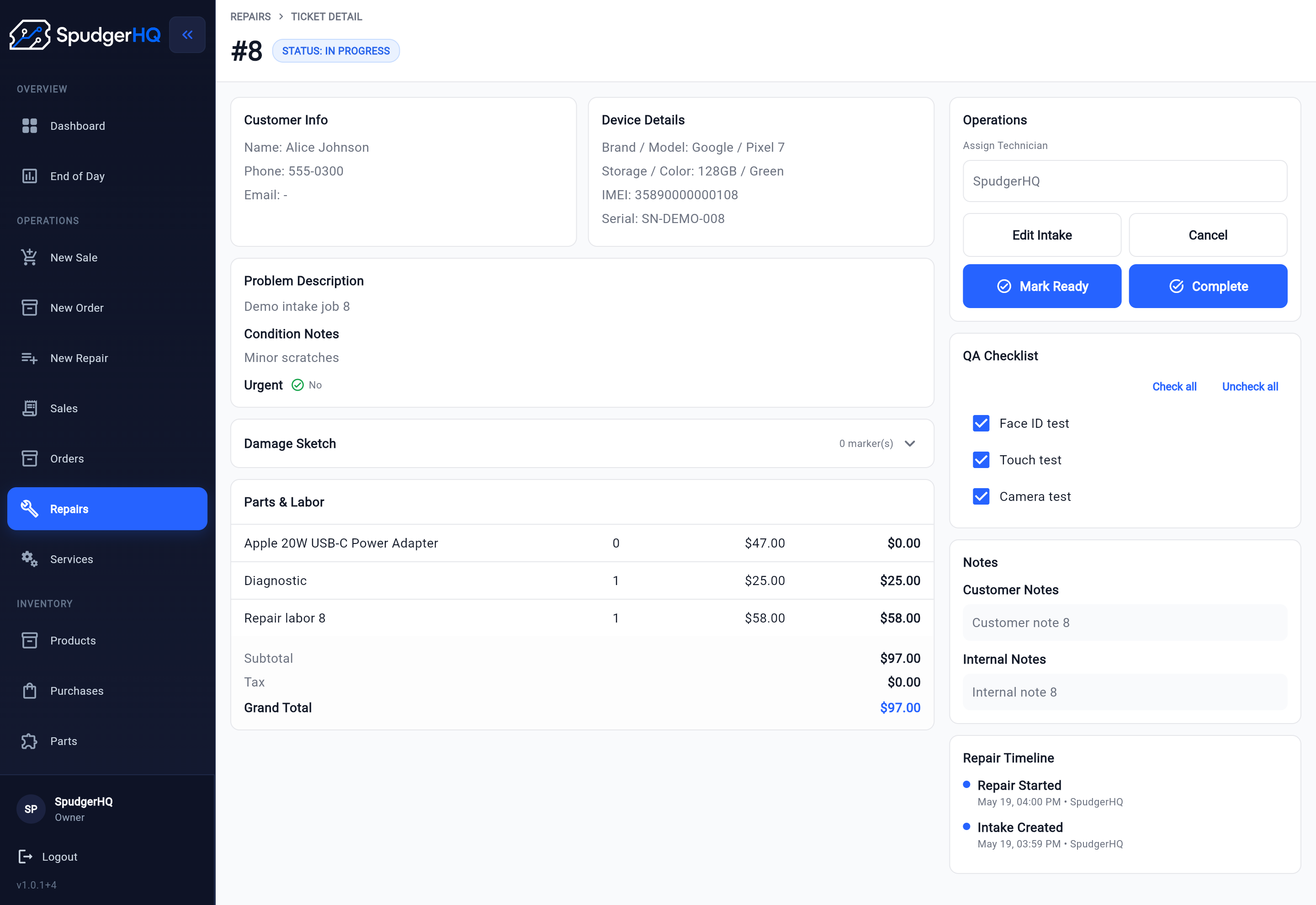
The SpudgerHQ Repair detail keeps the active job and its operational controls together.
From an open Repair, staff can review the customer and device, add Parts & Services, assign the work, keep notes, update status, and start the repair. QA, readiness, payment, completion, and the timeline remain available from that same record for operational follow-up.
This product view gives staff a detailed operational record for each repair instead of a generic support request.
The Repair record holds the details staff need to review or update as its status changes.
Keep the customer, Customer Device, reported issue, condition, notes, and agreement context on the job record.
Add Parts & Services, assign a technician, and record urgency and expected completion with the Repair.
Update progress and notes on the Repair, with parts context available when stock is holding up the job.
Record required quality checks and QA notes, then keep the Repair's ready status visible.
Record payment and completion, with the timeline and related transaction information available for future reference.
The right repair ticket system should match the work your shop actually performs.
For a solo owner, one operational record reduces the need to remember what happened between the counter and the bench. For a small team, assignment, status, notes, QA, and the timeline give front-desk staff and technicians shared context without relying on a verbal recap.
SpudgerHQ keeps this page focused on the commercial software fit. For a step-by-step operating model, use the repair ticket workflow guide. When stock holds up a repair, Handle a repair that is waiting for a part. For the broader system around intake, repairs, checkout, inventory, and daily operations, explore phone repair shop software.
Use these focused resources when you are ready to standardize a particular part of your repair ticket workflow.
Follow a practical operating process from intake and assignment through QA, payment, pickup, and review.
Read the workflow guideDefine useful repair statuses and the conditions for moving a job to its next stage.
Improve status trackingGive technicians the device, issue, condition, approval, parts, and next-action context they need.
Use the handoff checklistDefine the checks technicians should complete before a repaired device is marked ready.
Use the QA checklistA quick way to evaluate whether each repair record captures the details your team needs.
Repair ticket software keeps the operational details of a repair job together, including the customer, device, reported issue, status, assignment, parts or services, notes, QA, payment, completion, and history.
SpudgerHQ's Repair record is built for the details of a phone repair job. It connects device condition and intake details with assignment, current status, Parts & Services, notes, QA, payment, completion, and history.
Yes. Staff can record device condition and use Damage Sketch for a visual record of pre-existing damage. A versioned Repair Agreement can be prepared for customer review and signature, with signed snapshots retained in history.
Yes. Staff can add physical parts and service or labor items, review stock availability, and identify Repairs that are Waiting for Parts before work resumes.
Yes. The repair workflow is designed to give solo owners and small teams a shared view of customer and device context, technician ownership, status, notes, QA, payment, and completion without relying on scattered updates.
Use SpudgerHQ to keep device context, technician assignment, status, Parts & Services, QA, payment, and history connected to the job.