
Customer and device records separate
A name, phone model, and identifier are harder to reuse when each check-in starts as an isolated document.
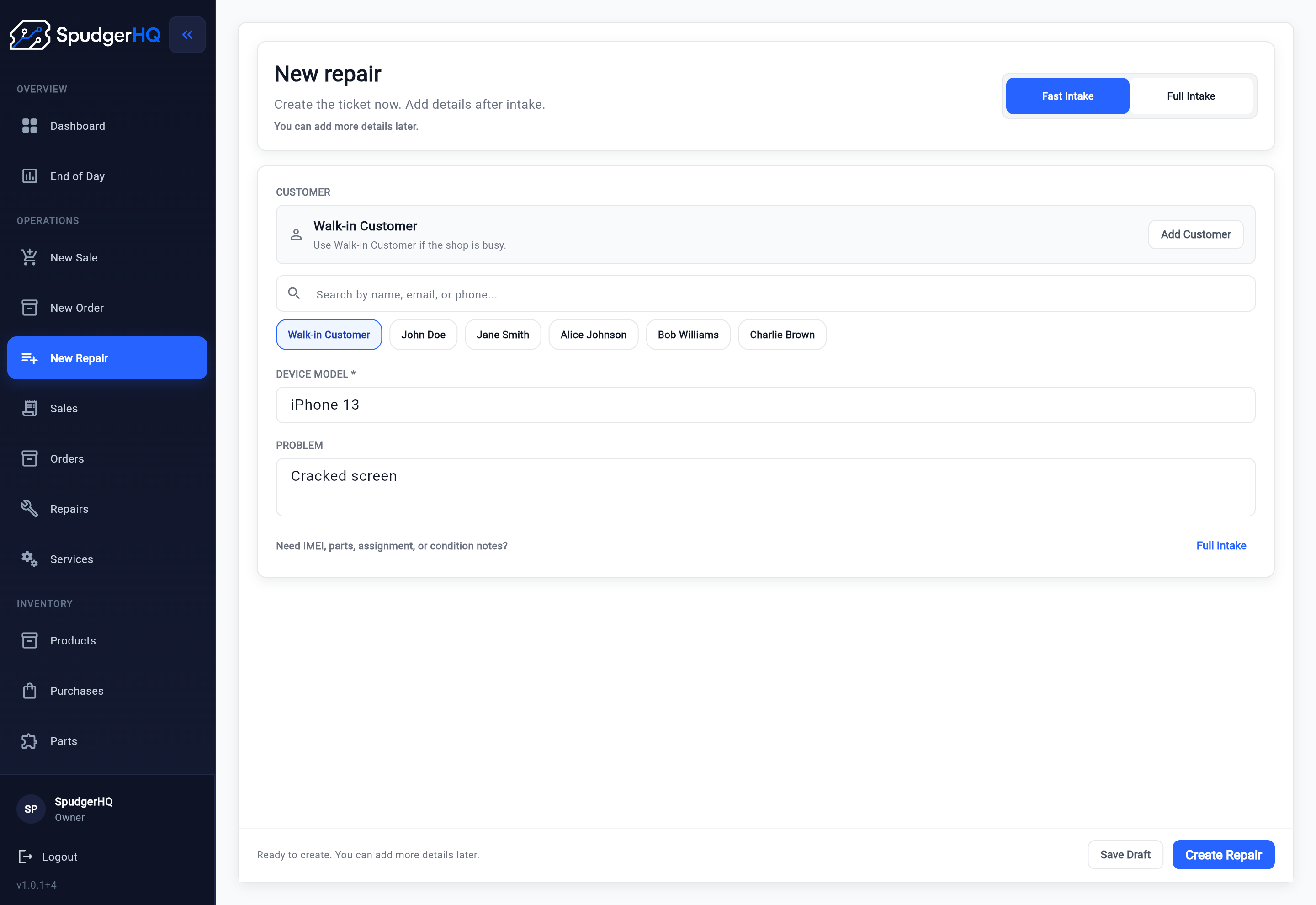
SpudgerHQ connects the customer, Customer Device, reported issue, condition, identifiers, notes, Parts & Services, technician, and expected completion in one Repair Intake. Staff can create the Repair without rebuilding loose notes at the bench.
Need the operating steps? Read the repair shop intake process guide
Paper and standalone forms can collect useful details. The gap appears when staff must re-enter those details, attach them to a customer and device, or explain the job again before a technician can start.
A name, phone model, and identifier are harder to reuse when each check-in starts as an isolated document.
Reported symptoms, visible damage, expected parts, approval, and internal reminders can become disconnected from the Repair.
Technicians lose time when the operational record does not show what the customer reported, what staff observed, and what was agreed at the counter.
Use the fields that matter for the job in front of you, while keeping each detail attached to the same Repair.
Choose an existing customer or a walk-in, create a customer during intake, and reuse a saved Customer Device or add a new one.
Record brand, model, IMEI, serial number, storage, and color where those details are useful to the shop.
Keep the customer-reported problem, current condition, customer notes, and shop-only internal notes distinct.
Improve condition notesDraw and retain a visual record of visible pre-existing damage with the Repair when written condition notes need more context.
Add expected parts and labor, review pricing and discounts, and check stock availability before committing to the next step.
Assign a technician, flag urgency, record expected completion, and prepare a versioned Repair Agreement when the shop needs customer review and signature.
SpudgerHQ supports both a quick entry path and a structured Full Intake for jobs that need a saved customer or device, identifiers, separate notes, parts, assignment, timing, or condition documentation.
Full Intake begins with the customer and Customer Device, then carries the reported problem, customer-visible notes, and internal notes into the Repair. Staff can add the remaining operational context before creating the job instead of copying it from a separate form later. For ways to reduce delays while keeping the key information, read Ways to keep intake fast without losing key details. To see how the counter handoff continues into assignment, status, QA, and completion, Move an intake into a repair ticket.
The software keeps intake focused on creating an accurate starting point, not on turning front-desk observations into a technician diagnosis.
Choose a walk-in or saved customer, then select or create the Customer Device and confirm its identifiers.
Preserve the customer-reported problem, visible condition, Damage Sketch, customer notes, and internal notes.
Add Parts & Services, review stock availability, assign a technician, and set urgency or expected completion when known.
Confirm the details, prepare a Repair Agreement when appropriate, and hand one structured record to the repair workflow.
Condition documentation is easier to use when it remains beside the customer, device, issue, notes, Parts & Services, and assignment context.
Staff can record neutral condition notes and use Damage Sketch to mark visible damage. The saved sketch remains part of the Repair record and can appear in the later agreement review flow; it is a visual condition record, not a photo-management feature.
A versioned Repair Agreement can present the current repair details and condition record for customer review and signature when the shop's process calls for it. Signed snapshots remain in the Repair history. If the repair scope changes, Record approval when the repair scope changes.
The right choice depends on what needs to happen after the customer hands over the device.
A printable or digital intake form is useful when the immediate need is a repeatable set of questions. SpudgerHQ's repair intake form generator creates that kind of standalone template.
Repair intake software is for shops that need the answers to become a live Repair: connected to reusable customer and device records, available to the technician, and ready to carry Parts & Services, approval, status, QA, payment, and history through the broader repair workflow.
Intake is one step in the wider workflow at a phone repair shop. The broader phone repair shop software system explains how customer and device records, repair tickets, and daily shop operations connect around each job.
Use each resource for its specific job: process design, field-level condition guidance, a counter checklist, or a standalone form.
Define the operating sequence from customer and device identification through a technician-ready handoff.
Read the process guideLearn what to inspect and how to write neutral, useful device-condition notes.
Improve condition notesUse a field-by-field checklist at the counter and adapt it to the shop's repair policy.
Use the intake checklistGenerate a printable form when the shop needs a standalone intake template rather than operating software.
Generate an intake formUse these answers to compare a connected Repair Intake with a standalone form or general-purpose note system.
Repair intake software records the customer, device, reported issue, condition, identifiers, notes, expected work, assignment, timing, and approval context, then keeps that information attached to the operational repair record.
An intake form captures a set of answers. Repair intake software turns those answers into a live Repair connected to reusable customer and device records, technician work, Parts & Services, status, QA, payment, and history, so staff do not have to re-enter the same job later.
Yes. Staff can choose an existing customer and Customer Device or create new records during intake. Walk-in Repairs are also supported when a saved customer record is not appropriate.
Yes. Staff can record condition notes and use Damage Sketch to draw and retain a visual record of visible pre-existing damage with the Repair.
Yes. New users receive a 14-day free trial. Continued use after the trial requires a paid Solo or Team plan; current promotional and regular prices are listed on the pricing page.
Start a 14-day free trial and test SpudgerHQ with the customer, device, condition, issue, Parts & Services, assignment, and approval details your shop actually uses.