
The repair ticket workflow at a glance
Use one visible sequence from the moment a device reaches the counter until the repair record is complete.
For a phone repair shop, a ticket is the working record for a repair—not merely a note or queue number. It should carry customer and device context, responsibility, status, work performed, final checks, and closeout information through the full repair lifecycle.
The exact status names can vary, but the next action and owner should always be clear. A practical sequence is:
- Capture the customer and device at intake
- Document the reported issue and device condition
- Assign the repair and confirm the next action
- Add parts and services; use a waiting state if work is blocked
- Perform the technician work and keep notes current
- Complete QA against the approved repair
- Mark the device ready for the customer
- Take payment and complete the repair
- Retain the repair history for future visits
Capture intake, issue, and device condition
The ticket should leave the counter with enough context for the bench to begin without reconstructing the check-in conversation.
Start with the customer, device, reported problem, identifying details such as IMEI or serial number when your shop records them, and any accessories received. Write the issue in the customer's terms first, then add concise internal context for diagnosis.
Record visible condition before work begins. Screen cracks, frame damage, missing screws, prior repair signs, liquid exposure indicators, and whether the phone powers on can affect the repair and the pickup conversation. A written condition note or a Damage Sketch can preserve that starting point; do not rely on memory.
If the counter is the bottleneck, tighten the process with repair intake software and a consistent guide to condition notes for phone repair intake.
Assign the repair and confirm the work scope
Ownership and approval context should be visible before the repair moves into active work.
Assign one person to the next action, even in a two-person shop. Ownership may change later, but the ticket should never leave the front desk and technician guessing who is responsible now.
Record what is approved, what still needs diagnosis, and what would require another customer decision. When your process calls for it, prepare a Repair Agreement that reflects the current repair details and condition record before work begins.
Use a concise technician handoff checklist so issue, condition, approval, access, and testing notes reach the bench together.
Add parts and services, then show when the repair is waiting
The ticket should reflect what the job now needs and why active work can or cannot continue.
Add the parts and services confirmed during intake or diagnosis. If the repair plan changes, update the ticket rather than leaving the new scope in a side conversation or loose bench note.
When a required part is unavailable, move the repair into a clear Waiting for Parts state and note the blocker. The status should change again when the part is received and the job can return to active work. The waiting-for-parts workflow guide covers this exception in more detail.
Keep technician work, status, and notes current
A useful ticket explains what is happening now and what must happen next.
Move the repair into active work when the technician starts. Add short notes at meaningful changes: diagnosis confirmed, service performed, unexpected issue found, approval requested, part fitted, or repair work finished.
Do not use status as a substitute for notes. 'In Progress' says where the job is; a note explains what changed. Together they let the front desk answer basic questions without interrupting the technician.
Keep the status list small enough to use consistently. The guide to repair status tracking for phone repair shops shows how to define statuses around the next action rather than every minor event.
Complete QA before marking the device ready
Repair work being finished is not the same as the device being ready for pickup.
Compare the completed work with the reported issue and approved scope. Run the relevant device checks, record the result, and resolve required QA items before moving the repair forward.
Only move the job to Ready after QA is complete and the ticket contains the pickup context the front desk needs. If a test fails or another issue appears, send the repair back to the appropriate working or approval stage instead of treating Ready as a holding status.
Use the phone repair QA checklist to choose checks that match the device and repair type.
Take payment, complete the repair, and retain the history
Close the operational loop only after the customer handoff and final financial state are clear.
At pickup, review the completed work and any final notes, collect the balance when due, issue the appropriate receipt or invoice, and hand the device back. Then mark the repair complete so Ready jobs do not remain mixed with work that still needs action.
Keep the completed record connected to the customer and device. On a future visit, repair history can show the original issue, condition, parts and services, technician notes, QA, payment, and prior outcome without rebuilding the story from scratch.
The repair checkout and pickup workflow covers the final review, payment, receipt, and device handoff in more detail.
Example: a screen repair from counter to closeout
A concrete job shows how the same record should change as the repair moves through the shop.
A customer brings in a phone with a cracked display and unreliable touch. The shop can move that repair through the workflow like this:
- At intake, record the customer, device identity, cracked screen, touch symptom, accessories received, and visible frame or back-glass condition.
- Assign the repair, confirm the approved screen service or diagnostic step, and record any condition or agreement context your shop requires.
- Attach the screen and labor. If the screen is unavailable, mark the repair Waiting for Parts with the blocker noted.
- When work starts, change the status and add notes for the diagnosis, part fitted, and any unexpected issue that affects approval or timing.
- Run repair-relevant QA such as display, touch, camera, speaker, charging, and button checks where applicable.
- Mark the phone Ready only after QA and final notes are complete.
- At pickup, review the work, take payment, issue the receipt or invoice, return the phone, and complete the repair.
- Retain the completed record so the shop can see this work if the same device returns.
Repair ticket workflow checklist
Use this short version to audit whether each job can move forward without a verbal reconstruction.
Build these fields into your paper process or use the free repair ticket template generator to create a starting structure for the shop.
How SpudgerHQ supports the repair lifecycle
SpudgerHQ treats a Repair as an operational lifecycle rather than a standalone note or generic support ticket.
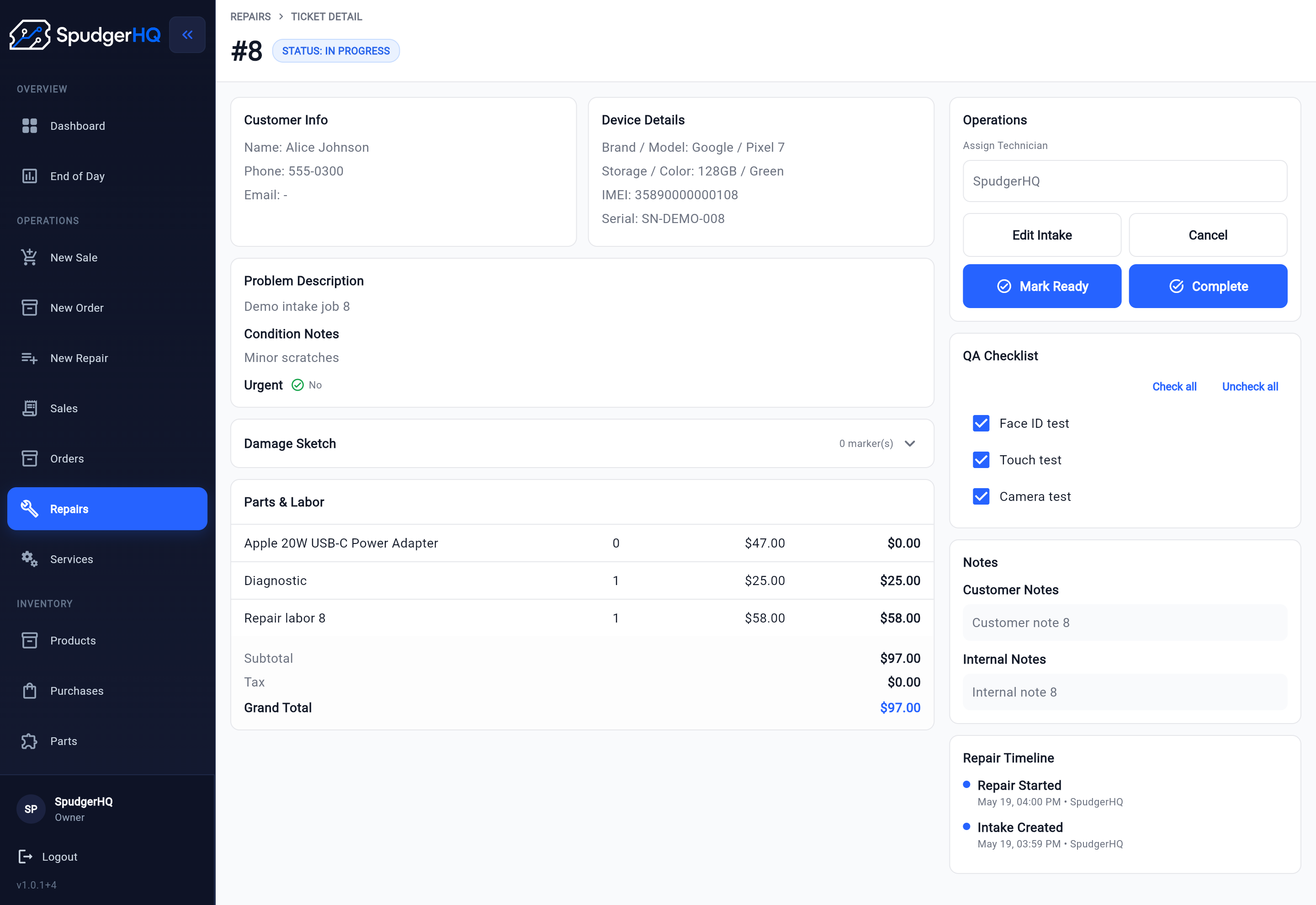
SpudgerHQ keeps customer and device intake, issue and condition details, Damage Sketch, technician assignment, Parts & Services, Waiting for Parts, QA, readiness, payment, completion, and repair history connected to the Repair. Repair Agreements can also preserve a versioned, signed snapshot when the shop's process requires customer consent.
The repair detail view gives staff one place to see the current status, customer and device context, assigned technician, Parts & Services, QA, notes, and timeline. That shared view helps the front desk and bench work from the same record as the job changes.
See repair ticket software for phone repair shops for the product details, or review repair workflow software for the broader path from check-in to pickup.
Keep every repair moving through one visible lifecycle
SpudgerHQ helps solo operators and small repair teams keep intake, ownership, parts and services, technician work, QA, payment, completion, and repair history connected.
Repair ticket workflow FAQ
What is the best repair ticket workflow for a phone repair shop?
Use a visible sequence from customer and device intake through issue and condition documentation, assignment, parts and services, technician work, QA, Ready, payment and completion, then retained repair history. Each stage should make the current owner and next action clear.
What information should stay on a phone repair ticket?
Keep the customer or walk-in context, device identity, reported issue, condition notes, approval context, assigned technician, parts and services, current status, technician notes, QA results, payment and pickup details, and completed repair history together where they apply.
When should a phone repair move to Ready?
Move a repair to Ready only after the approved work is finished, relevant QA checks are complete, failures or exceptions are documented, and the ticket contains the final notes the front desk needs for customer pickup.
How is a repair lifecycle different from a simple ticket?
A simple ticket may only record a request or status. A repair lifecycle carries the operational job from intake through ownership, parts and services, technician work, QA, payment, completion, and history, with the next action visible throughout.