
Repair work starts before checkout
Phone repair shop software needs to capture the customer, device, issue, condition, and approval context before work begins.
SpudgerHQ helps small phone repair shops manage faster intake, clearer repair tickets, checkout, inventory, purchasing, customer records, staff context, and end-of-day workflow from one repair-focused system.
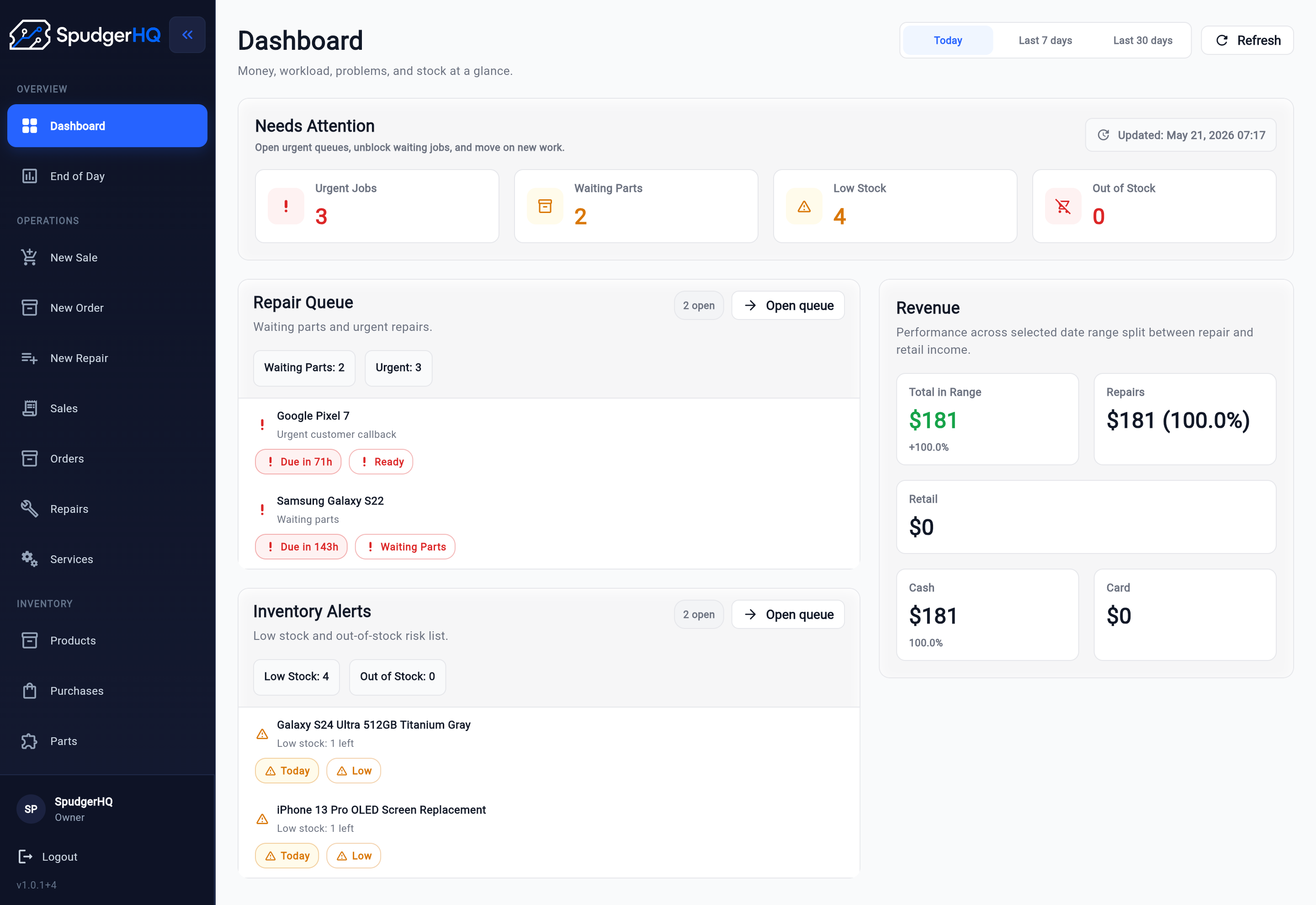
Small phone repair shops need more than a generic checkout screen. A repair job starts with customer check-in, device details, issue notes, condition notes, approval, parts or services, technician updates, QA, and pickup.
Phone repair shop software needs to capture the customer, device, issue, condition, and approval context before work begins.
Cell phone repair shop software should keep repair tickets, parts or services, customer records, checkout, and pickup connected without turning the shop into a generic retail workflow.
SpudgerHQ works as repair shop management software for small repair shops by keeping customer records, inventory, receipts, and activity visibility around the repair workflow.
The first job of phone repair shop software is to make check-in clear and fast.
SpudgerHQ starts with repair intake software because the front-desk intake moment shapes everything that follows. Staff can capture the customer, device, issue, condition notes, and next-step context before the repair enters the queue.
If the shop is still standardizing check-in, the repair shop intake process guide explains how to structure intake without slowing down the counter.
After intake, the repair ticket becomes the source of truth for the job.
SpudgerHQ keeps each repair visible with repair ticket software that tracks customer and device context, status, ownership, technician notes, QA, pickup readiness, and closeout.
For shops improving the full ticket path, the repair ticket workflow guide shows how tickets can move from intake through technician updates, QA, pickup, and closeout.
Shops comparing software can also review the best repair ticket systems by workflow fit, limits, pricing, and small-team suitability.
Use the repair ticket template generator to plan the customer, device, issue, status, parts, and closeout details your shop wants to capture.
The broad shop system should keep the repair job easy to follow while supporting the daily operations around it.
Capture customer, device, issue, and condition details before work begins.
Repair intake softwareCreate and manage repair jobs from check-in through status updates, QA, and pickup.
Repair ticket softwareSearch, create, and reuse customer profiles during intake and checkout.
Attach needed parts or services to repair work so the job is easier to follow.
Support cart checkout, cash and card payment flows, receipts, and transaction history.
Repair checkout processManage products, parts, suppliers, brands, categories, and purchases as supporting operations.
Read the inventory tracking guideSave a POS cart as an order when the counter workflow should continue later.
Support staff lists, business setup, team joining, and working client context.
Review dashboard activity, cash movement, business-day closeout, history, and exports.
A connected repair workflow helps the front counter, bench, and pickup process follow the same job from first conversation to closeout.
A customer walks in with a phone issue and staff start from the repair context, not a generic sale.
Staff find or create the customer record before capturing device details.
Device details, issue notes, condition notes, and intake information become structured context.
A repair ticket is created with the right parts or services attached when needed.
Technicians and front-counter staff can update each ticket as it moves through diagnosis, waiting for approval, waiting for parts, repair, QA, and ready for pickup.
Staff complete QA, handle payment when needed, and close out the job at pickup.
Owners review dashboard activity, cash movement, business-day history, and exports.
Phone repair shops do not work like generic retail stores or office teams.
SpudgerHQ is built around the repair workflow, while still supporting the daily shop operations around it: customer records, checkout, inventory, receipts, and activity visibility.
That means the broader shop system stays anchored to clearer repair workflow from check-in through repair tickets, status updates, QA, checkout, and pickup.
The product should help a busy shop move faster without adding process for its own sake.
Solo repair owners and small single-store teams often move between the front counter, technician bench, customer updates, closeout, and pickup. SpudgerHQ keeps the main workflow easy to scan so the next step is visible without adding enterprise-style complexity.
When the shop is ready to review plans, the pricing page is the right next step after confirming that the intake and repair ticket workflow fits.
These guides support the most important parts of the broader phone repair shop software workflow: intake and repair tickets.
A practical guide to capturing customer, device, issue, and condition details at check-in.
Improve repair intakeHow to move tickets through ownership, technician updates, QA, pickup, and closeout.
Improve repair ticketsUse a practical close to review repairs, pickups, payments, cash movements, inventory issues, and tomorrow's priorities.
Improve the daily closeUnderstand when a POS tool supports the repair workflow and when repair-specific intake still matters.
Review the POS guideCompare six POS options for phone repair shops by device intake, repair tickets, parts, checkout, pricing, and small-team fit.
Compare POS systemsEstimate parts, labor, markup, tax, discounts, and remaining balance before repair work starts.
Use the estimate calculatorPhone repair shop software helps repair businesses manage customer check-in, device details, repair tickets, status updates, parts or services, checkout, and customer records from one system.
For a small phone repair shop, useful software should support intake, repair tickets, status tracking, customer records, parts and services, checkout, receipts, and daily shop visibility.
SpudgerHQ is focused first on phone repair shops and small repair-focused teams. Its workflow is designed around repair intake, tickets, parts or services, checkout, and daily shop operations.
Generic retail software usually starts with products and checkout. SpudgerHQ starts with the repair workflow: intake, device details, issue notes, repair tickets, technician updates, QA, and pickup.
Start with faster intake and clearer repair tickets, then keep customer records, service context, closeout state, and shop history connected to the repair workflow.