
What is a generic POS?
A generic point-of-sale system is primarily designed to help a business sell products or services.
The usual workflow begins when staff add an item to a cart and ends when the customer pays.
A modern retail POS may help with:
- Product checkout
- Barcode scanning
- Taxes and discounts
- Cash and card payments
- Receipts
- Returns and refunds
- Basic inventory
- Customer records
- Sales history
- Staff access
- Retail reporting
Those capabilities can work well for accessory sales, device sales, and other straightforward counter transactions.
The limitation is not usually the checkout itself. The limitation appears when a customer leaves a device behind and the shop must manage everything that happens before the final transaction.
What is a repair shop POS?
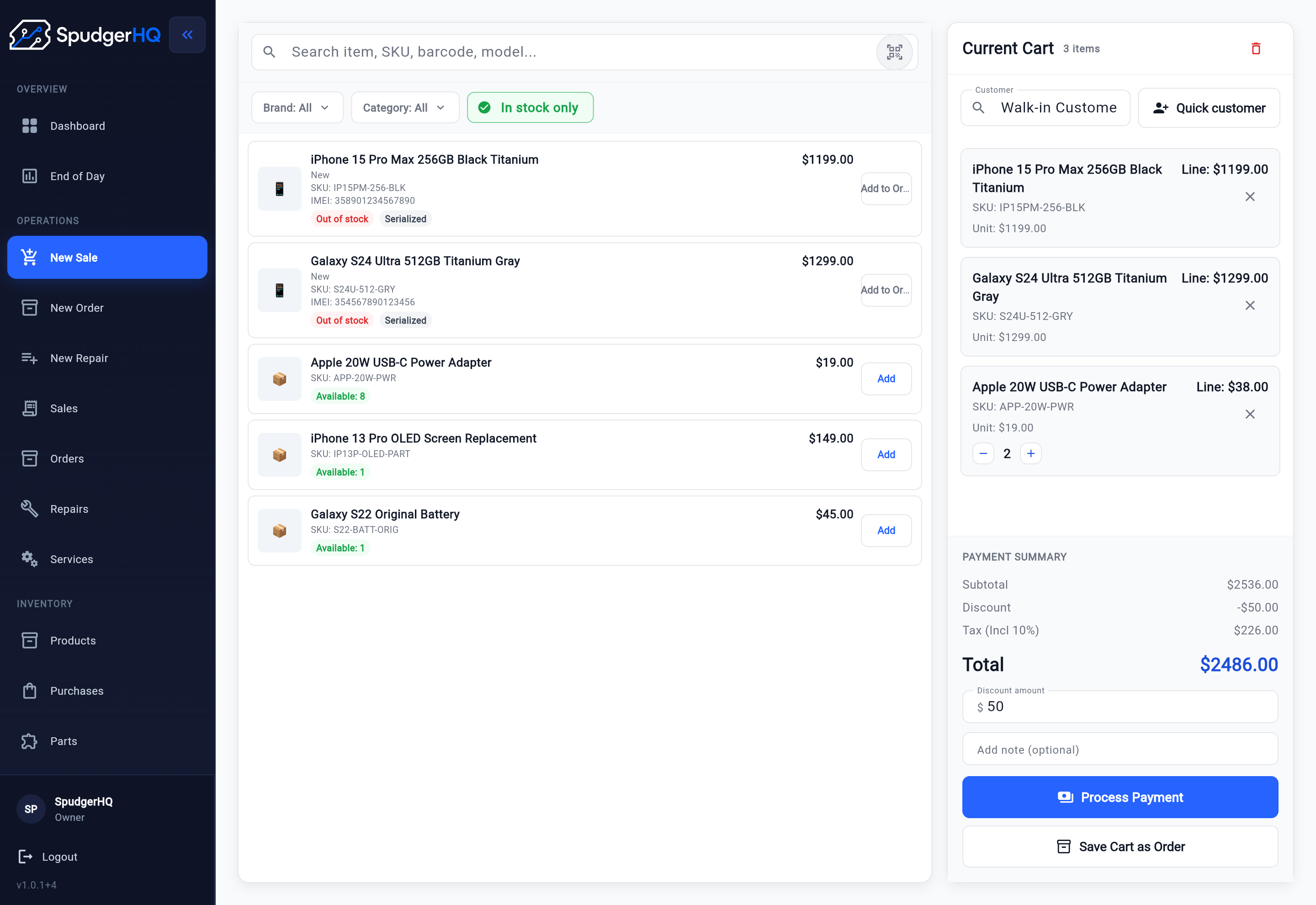
A repair shop POS connects checkout with the operational workflow behind the repair.
Instead of beginning with a product, the process often begins with a customer and a device.
The shop may need to record:
- Customer information
- Device type and model
- IMEI or serial number
- Accessories received
- Reported issue
- Visible condition
- Customer notes
- Approved work
- Expected completion
- Assigned technician
- Repair status
- Parts and services
- Internal notes
- QA results
- Final payment
- Pickup status
- Repair history
These details make structured repair intake software useful before work begins.
The repair ticket becomes the central operational record. Checkout is still important, but it is one stage in a larger workflow.
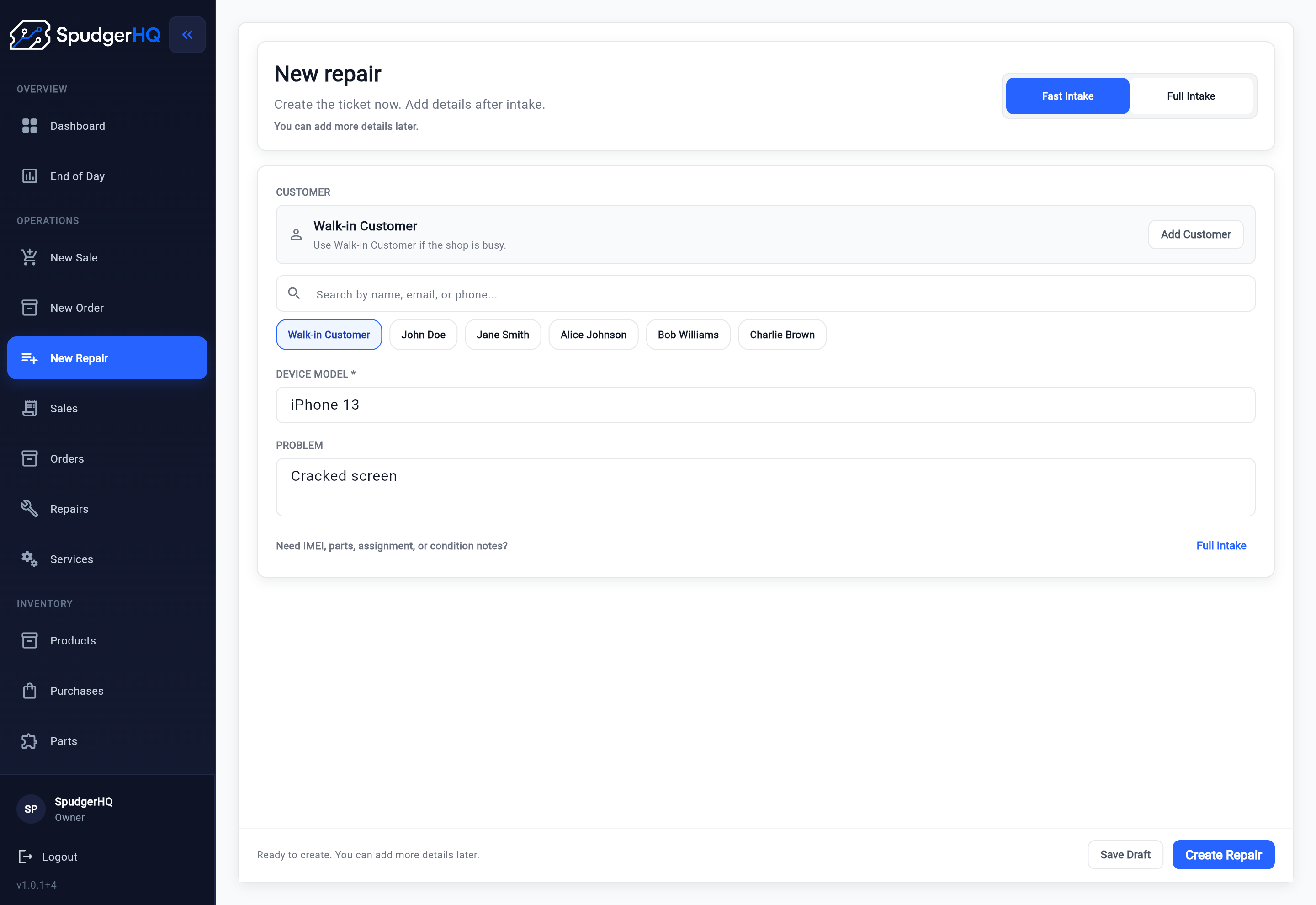
Generic POS vs repair shop POS comparison
Features vary by provider, but the operating models are usually different.
| Area | Generic POS | Repair shop POS |
|---|---|---|
| Starting point | Product or service added to a cart | Customer, device, and reported issue |
| Main record | Sale or transaction | Repair ticket or work order |
| Device information | Usually not a core workflow | Often connected directly to the repair |
| Repair intake | May require notes or another tool | Structured part of the workflow |
| Job status | Usually not central | Tracks progress from intake to completion |
| Technician assignment | Often unavailable | Connects work to the responsible staff member |
| Parts and services | Sold as line items | Can be connected to the repair job |
| Inventory | Focuses on products sold | May also track repair parts and reserved stock |
| QA | Usually handled separately | Can be included before completion |
| Payment | Commonly occurs at checkout | Can be connected to the repair and pickup |
| History | Transaction and purchase history | Customer, device, ticket, and repair history |
| Pickup | Receipt completes the transaction | Repair must also be completed and handed back |
| Staff accountability | Focuses on cashier activity | May include repair updates and completion history |
Starting point
- Generic POS
- Product or service added to a cart
- Repair shop POS
- Customer, device, and reported issue
Main record
- Generic POS
- Sale or transaction
- Repair shop POS
- Repair ticket or work order
Device information
- Generic POS
- Usually not a core workflow
- Repair shop POS
- Often connected directly to the repair
Repair intake
- Generic POS
- May require notes or another tool
- Repair shop POS
- Structured part of the workflow
Job status
- Generic POS
- Usually not central
- Repair shop POS
- Tracks progress from intake to completion
Technician assignment
- Generic POS
- Often unavailable
- Repair shop POS
- Connects work to the responsible staff member
Parts and services
- Generic POS
- Sold as line items
- Repair shop POS
- Can be connected to the repair job
Inventory
- Generic POS
- Focuses on products sold
- Repair shop POS
- May also track repair parts and reserved stock
QA
- Generic POS
- Usually handled separately
- Repair shop POS
- Can be included before completion
Payment
- Generic POS
- Commonly occurs at checkout
- Repair shop POS
- Can be connected to the repair and pickup
History
- Generic POS
- Transaction and purchase history
- Repair shop POS
- Customer, device, ticket, and repair history
Pickup
- Generic POS
- Receipt completes the transaction
- Repair shop POS
- Repair must also be completed and handed back
Staff accountability
- Generic POS
- Focuses on cashier activity
- Repair shop POS
- May include repair updates and completion history
A sale ends quickly; a repair remains open
A normal retail sale may take only a few minutes.
Staff scan the product, take payment, issue a receipt, and complete the transaction.
A repair is work in progress.
The shop may need to:
- Check in the device.
- Diagnose the problem.
- Wait for customer approval.
- Order or reserve a part.
- Assign the work.
- Update the repair status.
- Test the completed device.
- Collect the remaining payment.
- Return the device to the customer.
A system designed only around completed transactions may not provide a clear place for all those intermediate stages.
A repair shop manages customer-owned devices
A retail POS mainly tracks products that the business sells.
A repair shop also takes temporary responsibility for devices belonging to customers.
That creates additional information the team may need to record:
- Which device belongs to which customer
- IMEI or serial number
- Color, storage, and model
- Accessories left with the device
- Existing scratches or damage
- Lock or access instructions, when appropriate
- The issue reported by the customer
- The work the customer approved
When those details live only on paper, in a generic notes field, or in staff messages, it becomes easier for information to be lost during handoff.
A transaction record is not the same as a repair ticket
A transaction tells the shop what was sold, how much the customer paid, and when the sale occurred.
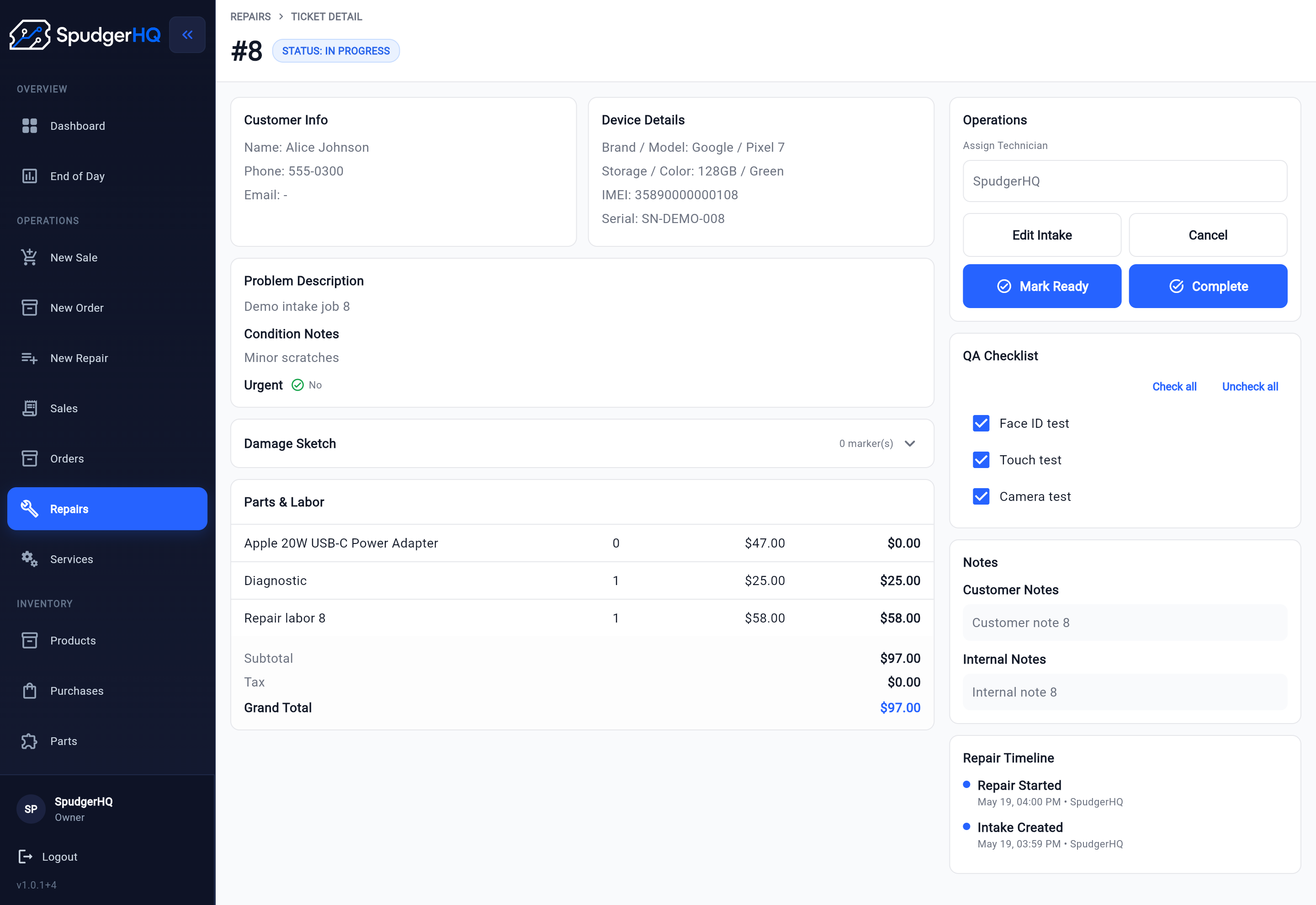
A repair ticket needs to explain what work is happening. Dedicated repair ticket software keeps that work attached to the operational record.
A useful repair ticket may include:
- Intake details
- Device information
- Problem description
- Condition notes
- Internal and customer-facing notes
- Assigned technician
- Current status
- Parts and services
- Expected completion
- QA results
- Payment connection
- Activity history
The ticket gives the counter and repair bench one shared record to follow.
Repair work needs visible handoffs
A small shop may have one person checking in customers while another completes repairs.
Even when the team is small, the information collected at the counter must reach the person doing the work.
A repair-specific workflow can help answer:
- Who is responsible for this job?
- What did the customer report?
- What work was approved?
- Which parts are needed?
- Is the device waiting for diagnosis or parts?
- Has the repair been tested?
- Is it ready for payment or pickup?
A generic POS may record the eventual charge without showing the work that led to it.
Parts and services need repair context
Both generic and repair-specific systems may support products and services.
The difference is whether those items are connected to the repair itself.
A repair shop may need to know:
- Which screen, battery, cable, or component was used
- Which service was performed
- Whether a required part is available
- Whether stock is reserved for a repair
- Who added or changed the item
- How the part and service affect the final repair total
Without that connection, staff may have to update a repair note, inventory spreadsheet, and checkout system separately.
Payment may happen at a different stage
In retail, payment usually completes the sale immediately.
Repair payment may happen:
- At intake
- After diagnosis
- When a part is ordered
- When the repair is complete
- At customer pickup
Not every repair shop uses deposits or partial payments, but the system should fit the shop’s actual payment process.
The important question is whether staff can connect the payment and receipt to the correct repair instead of treating it as an unrelated sale.
Completion involves QA and pickup
Taking payment does not always mean the repair workflow is finished.
Before returning a device, the shop may need to confirm:
- The approved repair was completed
- The device powers on
- The replaced component works
- Relevant functions were tested
- Customer data and accessories are accounted for
- The final amount is correct
- The customer received the device
- The repair status was closed correctly
A repair-specific system can keep those completion steps attached to the ticket rather than relying on memory.
Follow a practical repair shop checkout workflow to connect those completion checks with payment, receipt, and pickup.
Repair history is different from purchase history
Purchase history shows what a customer bought.
Repair history may need to show:
- Devices previously serviced
- Problems reported
- Work completed
- Parts used
- Technicians involved
- QA results
- Previous repair dates
- Warranty or follow-up context
- Payments connected to the job
That history can help staff understand a returning customer’s device without starting from scratch.
When a generic POS may be enough
A generic POS may be a reasonable choice when:
- Most revenue comes from retail sales
- Repairs are rare or very simple
- One person handles every repair from intake to pickup
- Devices do not remain in the shop for long
- Technician assignment is unnecessary
- The shop does not need structured repair statuses
- Device and repair history are not important
- The team is comfortable tracking repairs in another system
This may be the simplest starting point for a retail-first business.
However, the shop should account for the time and risk involved in maintaining separate repair records.
When repair shop POS software makes more sense
Repair-focused software is worth considering when:
- Repairs are part of the daily workflow
- Multiple devices are in progress at once
- Devices stay in the shop overnight
- More than one staff member handles a job
- The shop records device condition
- Work requires customer approval
- Repairs may wait for parts
- Technicians update job status
- Parts and services need to stay connected to the ticket
- QA must be completed before pickup
- Staff need to find customer and device history
- Payment should remain connected to the repair
The more handoffs and open jobs a shop manages, the more valuable a connected workflow can become.
Can a repair shop use a generic POS and separate repair software?
Yes.
Some shops use:
- A generic POS for payments and retail sales
- A separate repair-ticket system for jobs
- Another tool or spreadsheet for inventory
- Messages or notes for staff handoff
This can work, especially when each system has a clear purpose. Shops considering using Square in a phone repair shop can review that vendor-specific setup separately.
Before choosing that setup, consider:
- Will customer details be entered twice?
- Can staff connect a payment to the correct repair?
- Which system owns parts inventory?
- Where is the final repair total calculated?
- Can the counter see the latest repair status?
- Can technicians see what the customer approved?
- Will reports reconcile across the systems?
- How much time will staff spend switching tools?
Using separate systems is not automatically wrong. The trade-off is additional process and reconciliation.
How to choose between them
Do not choose based only on the checkout screen.
Write down what happens from the moment a customer enters the shop until the device leaves. Use the connected repair workflow as a reference when mapping each handoff.
Ask each software provider to demonstrate this exact workflow:
- Find or create a customer.
- Record the device and issue.
- Add condition notes.
- Create the repair ticket.
- Assign or hand off the work.
- Add a part and service.
- Update the repair status.
- Complete QA.
- Take payment.
- Issue a receipt.
- Complete customer pickup.
- Find the repair again later.
If the software handles only steps nine and ten, it is mainly solving checkout.
If it keeps the entire process connected, it is serving as a repair-shop operating system.
Repair shop POS evaluation checklist
Before choosing a system, confirm whether it supports the workflows your shop actually uses.
Customer and device intake
- Customer profiles
- Device profiles
- IMEI or serial number
- Issue details
- Condition notes
- Accessories received
- Customer approval
Repair management
- Repair tickets
- Custom or useful status stages
- Technician assignment
- Internal notes
- Activity history
- Expected completion
- Parts and services
- Waiting-for-parts workflow
Completion and checkout
- QA checklist
- Final price review
- Taxes and discounts
- Payment handling
- Receipts
- Pickup status
- Transaction history
Shop operations
- Inventory
- Purchasing
- Staff access
- Staff accountability
- Customer and device history
- Daily reporting
- End-of-day workflow
- Export and migration options
Only prioritize capabilities your shop will genuinely use. More features do not automatically create a better fit.
How SpudgerHQ fits
SpudgerHQ is designed for independent phone repair shops and smaller teams that want repair and retail workflows in one operational system. See the broader phone repair shop software category page for more context.
It connects:
- Customer and device intake
- Repair tickets
- Parts and services
- Staff activity
- Repair status
- QA
- POS checkout
- Payments and receipts
- Inventory
- Purchasing
- Customer records
- End-of-day operations
The product is intended to reduce the need to move the same job between paper tickets, spreadsheets, a standalone checkout tool, and separate staff messages.
SpudgerHQ is currently positioned for solo owners and smaller, single-store-first repair teams. Shops needing complex chain-level controls, extensive enterprise integrations, or highly customized multi-location processes should evaluate whether a broader platform is a better fit.
When workflow fit is clear, view pricing.
Keep the repair connected from intake to pickup
Use SpudgerHQ to connect customer and device intake, repair tickets, technician work, parts, status, QA, checkout, payment, and pickup.
Continue your research
Best POS Systems for Phone Repair Shops
Compare POS options by phone intake, repair tickets, parts, checkout, pricing, and small-team fit.
Read Best POS Systems for Phone Repair ShopsSquare POS for Phone Repair Shops
See when Square may be enough for a phone repair shop and when another repair workflow may still be needed.
Read Square POS for Phone Repair ShopsRepair Workflow Software
See how intake, tickets, technician updates, QA, checkout, and pickup connect.
Read Repair Workflow SoftwareGeneric POS vs repair shop POS FAQ
What is a repair shop POS?
A repair shop POS combines checkout with workflows used to manage repair jobs. Depending on the product, that may include customer and device intake, repair tickets, technician assignment, parts and services, repair status, QA, payment, and pickup.
What is the difference between POS software and repair management software?
POS software primarily manages sales and payments. Repair management software primarily manages jobs, tickets, devices, technicians, parts, status, and completion. A repair shop POS connects both areas in one system.
Can a phone repair shop use a regular retail POS?
Yes. A regular retail POS may be sufficient when the shop mostly needs product checkout, payments, receipts, and basic inventory. Shops handling repairs regularly may still need another system for intake, tickets, device details, status tracking, QA, and pickup.
Is repair-specific POS software only useful for large shops?
No. A solo owner or small team may benefit when multiple repairs are open at once, devices remain in the shop, or information must stay clear between the counter and repair bench. The correct choice depends on workflow complexity rather than team size alone.
What features should a phone repair shop POS include?
Useful features may include customer and device intake, IMEI or serial tracking, condition notes, repair tickets, technician assignment, parts and services, status tracking, QA, payments, receipts, inventory, customer history, and pickup completion.
Can I use one system for repairs and another for payment?
Yes. A repair shop can use separate systems. Before doing so, confirm how customer records, repair totals, inventory, payments, receipts, and reporting will stay synchronized.